Case studyAI architecture and HR data
Designing a reliable ChatGPT + MCP architecture to query Eurécia HR data
A company wants its authorised teams to be able to ask plain-language questions about the employees, contracts, leave, overtime and pay available in Eurécia. The challenge is not simply to “plug in ChatGPT”: it means choosing the right combination of conversation, project, connector, MCP, API, n8n automation and application, then guaranteeing that every answer rests on data that is fresh, controlled and traceable.
- ChatGPT + MCP
- HR data
- Business API
- Context
- A company using Eurécia for several internal HR purposes
- Data
- Employees, contracts, leave, overtime, pay
- Tools studied
- ChatGPT, projects, connectors, MCP, API, n8n, scripts
- Priority
- Reliability, data freshness and access control
(01)Before the target architecture
Before: several possible tools, but no clear rule for choosing between them
Teams already use ChatGPT to analyse information, find things in documents, write summaries or prepare answers. As soon as they need access to live business data, the options multiply: standard conversation, custom project, agent, connector, GPT Action, MCP server, n8n scenario or dedicated application.
Without an explicit architecture, the same need can be handled in several ways depending on who sets it up. Some solutions work for a demo but become slow, fragile or hard to maintain. Others give a plausible answer but make it hard to check the source, the date of the last update or the permissions applied to the request.
So the problem is not a lack of tools. If anything it is the opposite: avoiding a different hammer for every nail just because they all now carry an “AI” label.
(02)Architecture put in place
Case studyAfter: ChatGPT becomes the interface, but data and rules stay in controlled systems
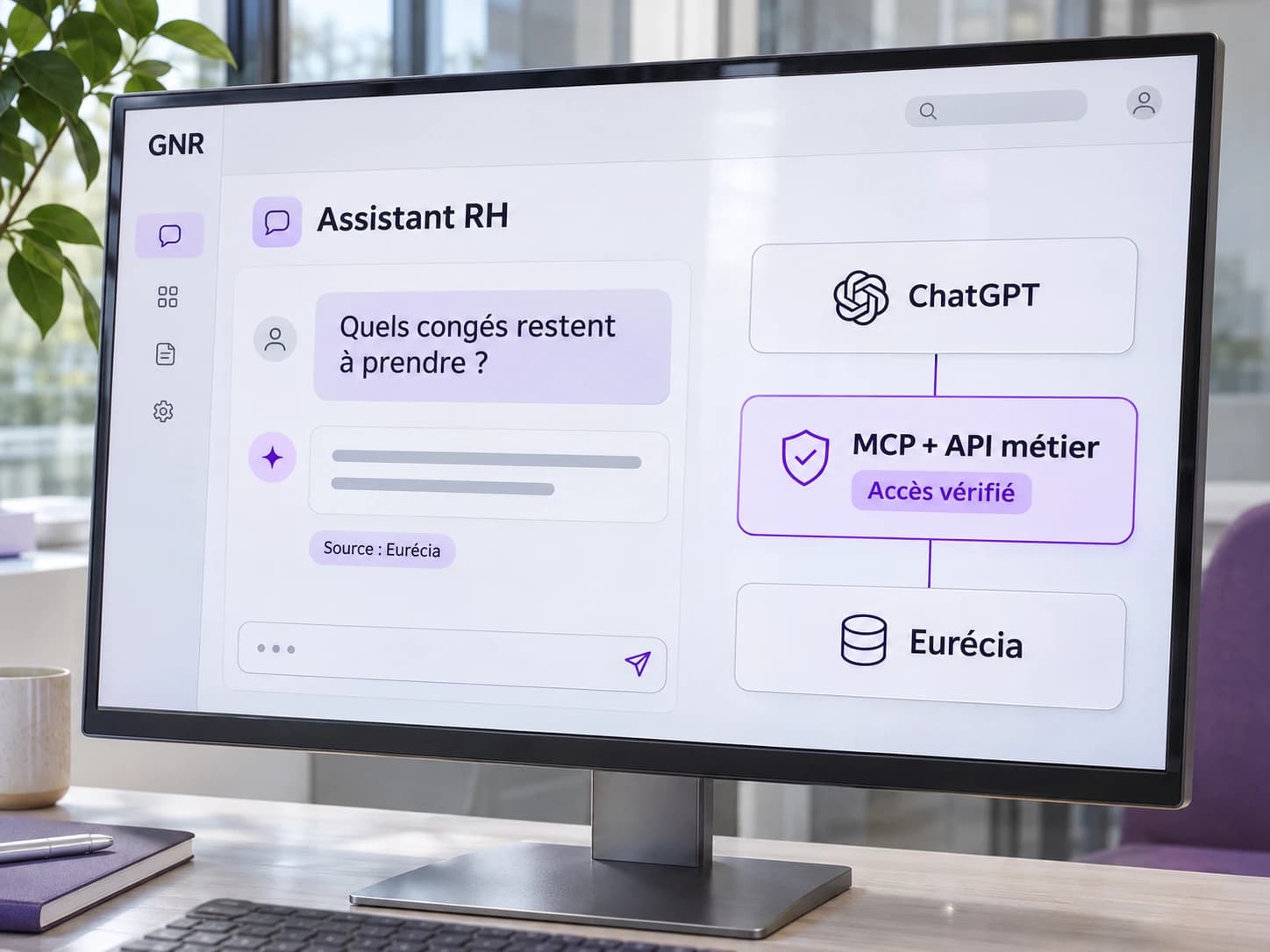
The architecture separates responsibilities. ChatGPT understands the question, presents the answer and orchestrates the call to an authorised tool. The MCP server exposes only the capabilities needed, such as finding an employee, checking a leave balance or getting the overtime for a period.
Calls to Eurécia go through a business access layer that applies the controls: authentication, user scope, parameter validation, retrieval of up-to-date data and logging. n8n remains useful for asynchronous processing, notifications or synchronisation, but is not used as a universal answer to every interactive request.
A dedicated application or script is chosen when the need calls for a specific interface, deterministic calculations, high volumes or a user experience that goes beyond a conversation.
(03)How the architecture runs
Case studyA user’s question follows a short, controllable path.
The steps that handle HR data remain deterministic.
- 01
Receive the question in ChatGPT or the chosen interface
- 02
Identify the intent and the data needed
- 03
Select the MCP tool or API that fits the need
- 04
Check the identity, permissions and parameters of the request
- 05
Query Eurécia or the authorised business source
- 06
Return structured data with its useful context
- 07
Generate a readable answer without inventing missing information
- 08
Log the call, errors and any exceptions
What stays under human control
- Defining which data each profile can actually access
- Validating sensitive use cases, pay in particular
- Choosing which actions are allowed in read or write mode
- Handling ambiguous or out-of-scope requests
Possible operational effects
- Fewer manual searches across several HR screens
- Answers based on an up-to-date data source
- An architecture that is clearer and simpler to maintain
- Consistent tool choices for each type of need
(04)Example HR question
Case studyAn authorised manager can ask:
“Which employees on my team have more than 5 days of leave to take before the end of the year?”
ChatGPT must not answer from remembered context or an old extract. It calls the authorised tool, retrieves the relevant data from Eurécia, applies the manager’s scope and writes the answer from the result. If the information is unavailable or the user lacks the necessary permissions, the answer says so explicitly.
(05)Choosing the tools
Why not do everything with one tool?
| Need | Preferred tool | Reason |
|---|---|---|
| One-off analysis | Preferred toolChatGPT conversation / project | ReasonFast, little integration needed |
| Conversational access to Eurécia | Preferred toolMCP + business API | ReasonControlled tools, fresh data, separation of responsibilities |
| Scheduled processing | Preferred tooln8n | ReasonOrchestration, scheduling, notifications and retries |
| Complex business workflow | Preferred toolApplication / script | ReasonFine control, deterministic logic, testing and a dedicated interface |
(06)Points to watch
Five things to keep an eye on.
- 01HR data must never be exposed to a user outside their scope.
- 02A business answer must be traceable to a source and a retrieval date.
- 03MCP tools must stay limited to explicit, controllable capabilities.
- 04Asynchronous automations must handle errors, retries and duplicates.
- 05Missing or ambiguous data must produce an explicit answer, not a convincing approximation.
Pay, contract and absence data in particular demand strict management of permissions, traceability and confidentiality.
(07)Conclusion of the case
The right choice is not “ChatGPT or MCP”, but an architecture suited to each responsibility
In this scenario, ChatGPT remains the conversational interface, MCP exposes the authorised capabilities, the business API protects access to the data and n8n automates the processing that should be automated. This separation makes the whole clearer, more testable and more reliable than a pile of connectors used without a common rule.
(08)Related case
Making exchanges between business tools reliable too
The same principle of source of truth, control and logging applies to conventional integrations between CRM, ERP and messaging.
Synchronising several business tools without losing the source of truth
See how to organise identifiers, responsibilities and exceptions across several systems.
View the case studyServices behind this project